 Family Security Playbook
How to build your Family Security Playbook
About 20 minutes, on a computer or tablet. You'll finish with a large-print playbook to print and keep by the computer: who to call, what to do if something seems wrong, and how the accounts are protected.
Download these instructions (PDF)
Before you start
- Have a recent bank statement or your bank card, the cell phone bill and an insurance card nearby. You'll copy phone numbers from them.
- You'll never be asked for a password, a PIN or a full account number. If a page ever asks, stop and call us.
- Your answers stay in this browser tab. We only receive the playbook if you send it for a printed copy, and then delete the file within 14 days. Keep the tab open until you've downloaded the playbook, and save your answers on the last page so you can update it next year.
- Building it for a parent? Sit with them, or have their bank card and phone bill handy.
Where to find the numbers
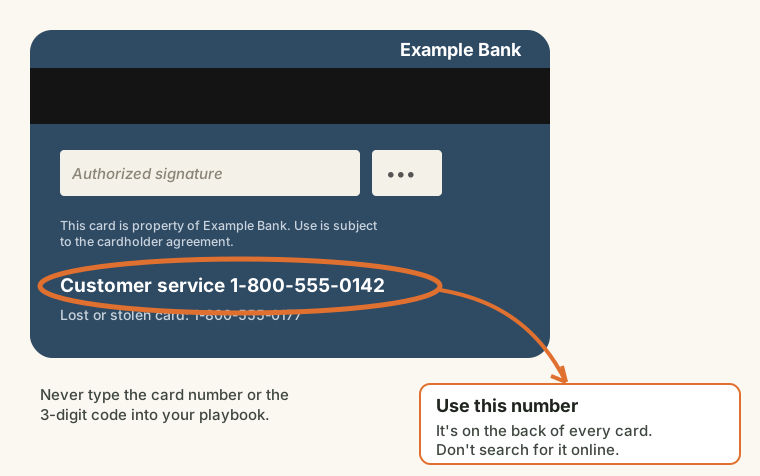
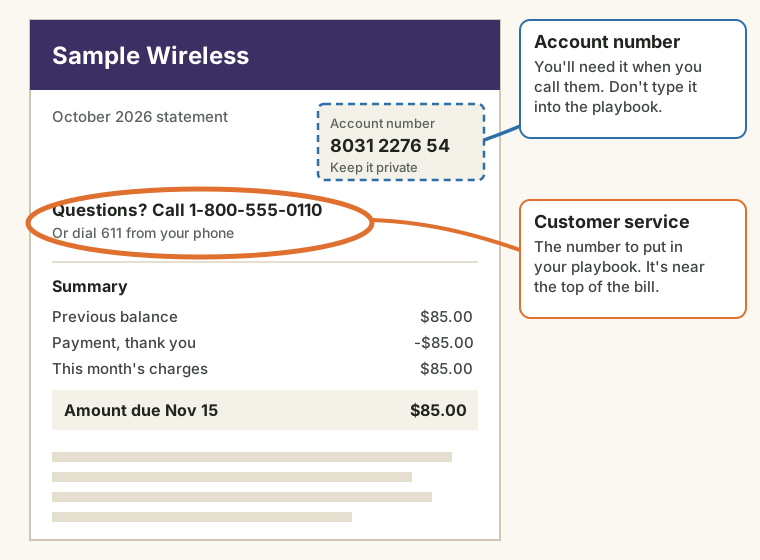
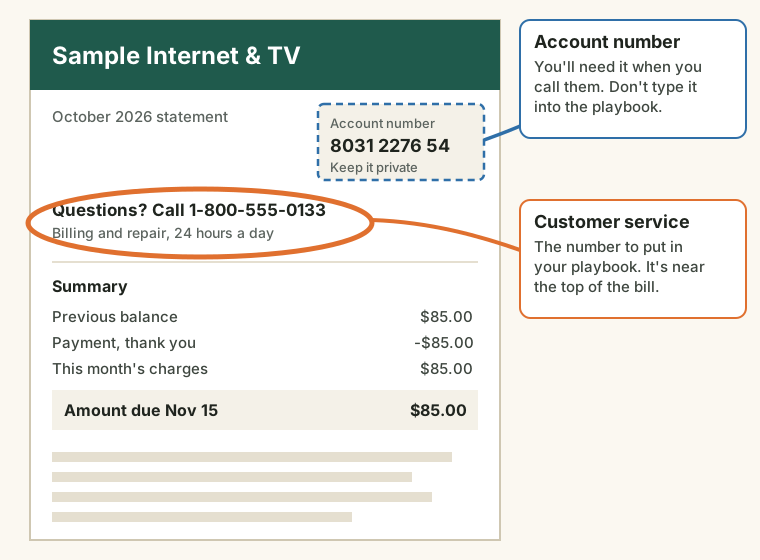
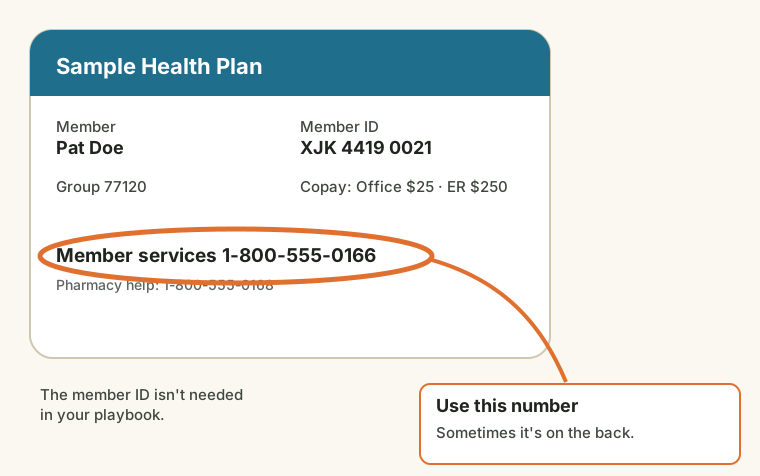
The playbook asks for phone numbers you already have on cards and bills. Here's where they usually are. (These are made-up examples.)
Open your playbook
- Use the link in the email you got after buying: Start or return to your playbook here. The same link works until the date in that email.
- Got a code from a credit union, church, employer or computer shop? Go to the address they gave you (or familysecurityplaybook.com/start), type the code, and press Start my playbook.
- Lost the email? On the start page, enter the email address you bought with and press Email me my link.
Go through the steps
- Let's build a security playbook. Choose who it's for: yourself, or a parent or relative. Took our free scam quiz? Press Start from my answers, or type your results code (it looks like Q-7KX2-M). Updating last year's playbook? Press Open saved answers and choose the file you saved.
- Who is it for, and who helps them? The full name printed on the playbook, the state they live in, the local police non-emergency number, and the family helper: the first person to call when something seems wrong.
- Banks and cards. Each bank, credit union and card, with the phone number from the back of the card or a statement. Don't search for bank numbers online: fake ones are a common trap.
- Cell phone company. Pick the company and check its number against the bill. Ask them for a number lock and an account PIN; the playbook lists it as a to-do until you do.
- Other important numbers. Health insurance, doctor, pharmacy, internet and TV. Scammers often pretend to be one of these.
- Accounts and the second login step. For email, banking and other key accounts, choose which second step each uses (a text code, an app, a phone prompt or a security key), or Not turned on yet to put it on the to-do list.
- Devices. The phones, tablets and computers used for email or banking, how each is locked, and how it's backed up.
- What is already in place? Tick what's done: a credit freeze, a family code word, backups and so on. Anything not ticked becomes the playbook's to-do list.
- Review and download. Check the summary, then press Download the playbook (PDF). The first download fixes the name; after that you can correct anything else and download again until your access ends. Press Save my answers for next year too: it puts a small file on your computer for next year's update.
Print it and use it
- Print the playbook and keep it by the computer. Put the one-page emergency sheet on the fridge.
- Cut out the wallet cards: one for the person it's for, one for the family helper.
- Give the family helper a copy, and walk them through the first page.
- If your plan includes a printed copy, press Send for printing on the last page. It's mailed to the address you enter.
- Practice one scam call together with the free practice call. It takes 15 minutes.
- Once a year, open the playbook again with your link, press Open saved answers, change what's new, and download a fresh copy.
If your playbook came from a computer shop or security provider
- The first page asks where you're starting: Get prepared (nothing has gone wrong) or Something happened.
- If something happened: call your provider first on the number shown. Then the steps help you write down what happened, your banks, accounts and devices.
- On the last step, press Save the file for your provider and send it to them as they ask. It helps them help you faster. It never contains passwords.
If something doesn't work
- "The page did not finish loading." Reload the page. Your link still works.
- You closed the tab and your answers are gone. Open your link again and start over, or press Open saved answers if you saved a file. Next time, keep the tab open until you've downloaded.
- The name on the playbook is wrong. The first download fixes the name. Email us and we'll reset it.
- Your link says it has ended. Your access has run out. Email us, or renew from the email we sent before it ended.
Stuck?
Email jeff@jcady.org or call (520) 223-9878 ext. 800, and say which page you're on. We'll never ask for a password, a code from your phone, or a card number.