 Family Security Playbook
How to build your Small Office Security Playbook
About 30 minutes, on a computer. You'll finish with a printed plan for the day your office's email is hacked, an invoice is fake or a screen demands a ransom.
Download these instructions (PDF)
Before you start
- Have the names and phone numbers of the people who'd handle a problem: who decides, a backup, whoever looks after your computers, and who speaks for the organization.
- Have your bank's business fraud line (on the back of the business card or in the bank's app), and your insurer's and attorney's numbers if you have them.
- You'll never be asked for passwords or account numbers. The plan holds names and phone numbers only.
- Your answers stay in this browser tab and are never sent to us. Keep the tab open until you've downloaded, or save your answers on the last page.
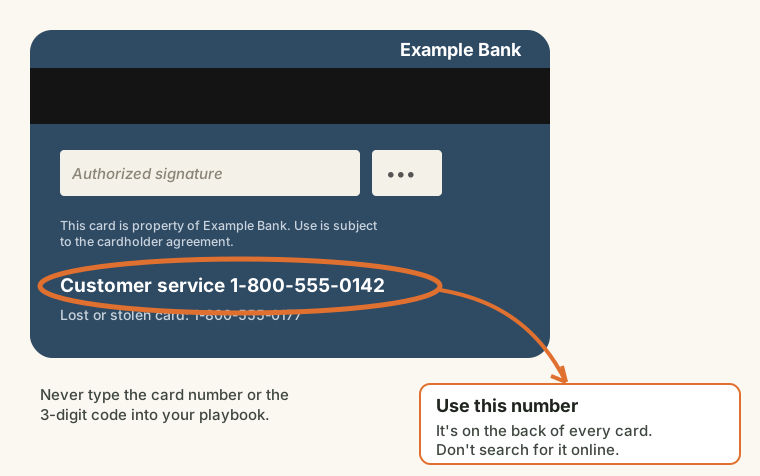
Where to find your bank's fraud line
It's on the back of your business bank card, or in your bank's app or online banking under "Contact us". (A made-up example.)
Open it
- Use the link in the email you got after buying, or the office code from your IT provider: type it at the address they gave you.
- Took the free Small Office Security Checkup? On the first page, type its results code (it looks like C-3N27-ECR4), or press Start from my answers in the same browser. The money rules you already follow are ticked, and the other gaps go on a "still to fix" page.
- Updating last year's plan? Press Open saved answers.
Go through the steps
- About your organization. The name printed on the cover (fixed at the first download), the kind of organization, and the city and state.
- Who handles it. Name people, not job titles: the incident lead who decides, a backup, an IT helper (a person or a local computer shop) and the one person who speaks for you.
- Who you'll call outside. Your bank and its business fraud line, your insurer's claims line, your attorney and the police non-emergency number. Leave blank anything you don't have.
- Your systems. For email, banking, payroll and the rest: the provider, and who can manage it if it's broken into. Names only.
- Your money rules. Tick the rules you already follow, and set the amount above which two people approve a payment. The rest go on a to-do list.
- Which situations to include. Each gets its own page. We suggest all six.
- Download your plan. Press Download my plan (PDF), then Save my answers for next year.
After you download
- For your cyber insurance application: one page lists what insurers commonly ask about (a second login step, payment checks, backups, training, a written plan), whether your plan has it, and the proof to keep. Keep it with your insurance papers. It doesn't promise coverage; answer every application truthfully.
- The free office checkup also has Print the board summary: type your organization's name, and it prints one page for your board or owner with your score, the first three fixes (with a place to write who and by when) and the decisions only they can make. Retake the checkup every year; the free office security calendar reminds you each December.
- The free office checkup also has Print the insurance summary, and the office scam drill prints a sign-in sheet for your training records.
- Print two copies: one for the office, one kept away from the computers (a fire safe or someone's home).
- Walk your team through page one: the first 15 minutes, and who to call.
- Run the free office scam drill at a staff meeting, and keep the signed sign-in sheet with the plan.
- Use the incident log at the back if anything happens: your insurer, bank and attorney will ask for times.
- Once a year, open the plan with your link, press Open saved answers, update the names and numbers, and reprint.
Stuck?
Email jeff@jcady.org or call (520) 223-9878 ext. 800, and say which page you're on. We'll never ask for a password, a code from your phone, or a card number.